
Managing a distributed team across time zones works best when you stop trying to make everyone available at once and instead engineer a deliberate overlap window, strong asynchronous habits and structured handovers. For UK and EU companies working with teams in India (IST, GMT+5:30) or the Gulf (GST, GMT+4), the maths is favourable: you can secure 4 to 6 hours of daily overlap for live collaboration and let focused work continue around it. With a managed model, the provider aligns the team to your core hours from day one, so the overlap is reliable rather than ad hoc.
This playbook covers how to choose your overlap window, the async habits that keep a cross-time-zone team in sync, how to run handovers, and the tooling that makes it all stick.
How big is the overlap between IST/GST and GMT?
The gap is smaller than people assume. IST is GMT+5:30 and GST is GMT+4, so a typical Indian or Gulf working day overlaps a UK day comfortably through your morning and into the early afternoon, and overlaps a Central European day for even longer. The practical result is a dependable 4 to 6 hour window for stand-ups, pairing and reviews, with earlier coverage on top.
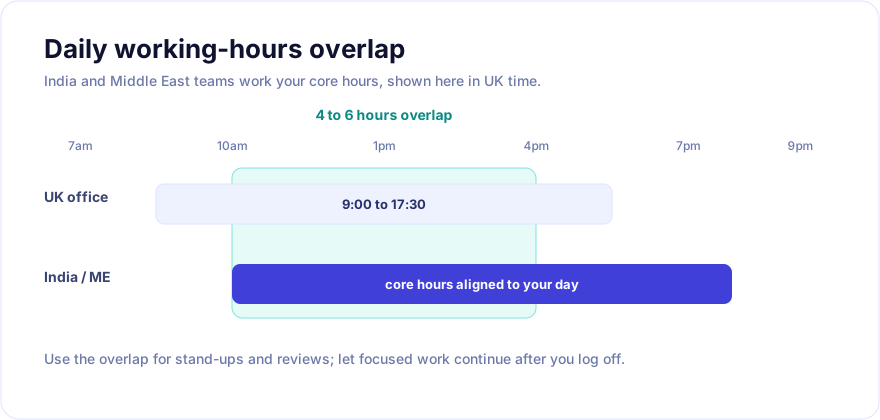
| Team location | Offset to GMT | Typical overlap with UK (9:00-17:30) | Best use of the overlap |
|---|---|---|---|
| India (IST) | +5:30 | ~late morning to mid-afternoon | Stand-up, reviews, pairing on blockers |
| Gulf / UAE (GST) | +4 | ~mid-morning to mid-afternoon | Live decisions, demos, design discussion |
| UK (GMT/BST) | 0 / +1 | reference | Core synchronous hours |
| Central Europe (CET) | +1 / +2 | even longer overlap | Extended live collaboration |
The goal is not maximum overlap; it is enough overlap for the few things that genuinely need real-time conversation, with everything else handled asynchronously.
How do you choose and protect the overlap window?
Pick a 3 to 4 hour core window that sits inside both teams' normal working day and defend it. Within that window, schedule only what benefits from being live: the daily stand-up, code and design reviews, pairing on blockers, and decisions that would otherwise ping-pong over chat for a day.
Protect it with two rules. First, keep the window meeting-light - it is for unblocking and deciding, not status theatre. Second, do not let either side routinely book over it; if the overlap erodes, the team quietly falls back to slow, sequential email-style work. A managed provider that aligns the team to your hours makes this far easier to hold; see how OSCABE structures core-hours alignment on our how it works page.
It also helps to pick the window with the human day in mind, not just the clock. A slot that lands in the late afternoon for one region every single day will wear people down, so choose hours that are reasonable on both sides and rotate the occasional unavoidable out-of-hours call rather than fixing it permanently on one team. Sustainability is what keeps the overlap genuinely productive month after month.
What async habits keep a distributed team in sync?
Outside the overlap window, asynchronous habits do the heavy lifting. The teams that thrive across time zones treat writing as the default communication mode.
- Write decisions down. Capture decisions, context and rationale in a durable place (a doc, an issue, an architecture decision record), not in a chat thread that scrolls away.
- Make work visible. Keep the ticket board current so anyone can see status without asking. A blocked ticket should say why it is blocked and who can unblock it.
- Default to async, escalate to sync. Try to resolve in writing first; reserve a live call for genuinely ambiguous or contentious points.
- Set response-time expectations, not always-on expectations. Agree that messages get a reply within, say, one working day, so nobody feels they must watch chat overnight.
- Record the important conversations. A short recorded walkthrough often beats a meeting nobody outside the overlap could attend.
These habits are exactly what a strong 30-day onboarding should establish; our guide to onboarding an offshore development team in 30 days shows where they fit in the first month.
How should handovers work across time zones?
Handovers are where distributed teams either compound progress or lose a day. A good handover is a short, written summary passed at the edge of the overlap window so the next active region can pick up without waiting.
A simple, repeatable handover note covers:
- Done: what shipped or progressed since the last handover.
- In progress: what is mid-flight, and where the code or document lives.
- Blocked: what is stuck, why, and who can clear it.
- Next: the priority for the receiving region.
Done well, handovers turn the time-zone gap into an advantage: work can move forward for more hours of the day than a single-location team could manage. Done badly - or skipped - the gap becomes idle waiting. The discipline is worth building into your rituals explicitly.
Keep handovers short and standardised. A note that takes five minutes to write and one to read beats a sprawling status update nobody finishes. Post it in the same place every day so the receiving region knows exactly where to look, and attach links rather than re-explaining context that already lives in an issue or document. Over a few weeks the format becomes muscle memory, and the gap between regions stops being a daily renegotiation and becomes a quiet, reliable baton pass.
What tooling makes cross-time-zone work easier?
You do not need exotic tools; you need a small, consistent stack used the same way by everyone.
- Source and reviews: Git with pull requests and clear review expectations.
- Work tracking: one board (Jira, Linear or similar) kept genuinely up to date.
- Docs and decisions: a searchable knowledge base for durable context.
- Async video: short recorded walkthroughs (Loom-style) for demos and explanations.
- Chat with norms: threaded channels, agreed response windows, and no expectation of instant replies outside the overlap.
- Shared calendar: every meeting shown in attendees' local time to avoid confusion.
The common thread is that the tooling supports writing things down and making work visible, which is what lets a distributed team operate without everyone being online together. Resist the urge to add more tools; consistency beats coverage. A team that uses three tools well, the same way, every day will outperform one juggling ten with no shared conventions. When a new habit is needed, change how you use the existing stack before reaching for something new.
How does a managed model help with time zones?
A managed model removes the biggest practical obstacle: getting the team to actually keep your core hours, consistently, week after week. Rather than negotiating availability with individual freelancers, you get a dedicated team employed and managed to work your schedule.
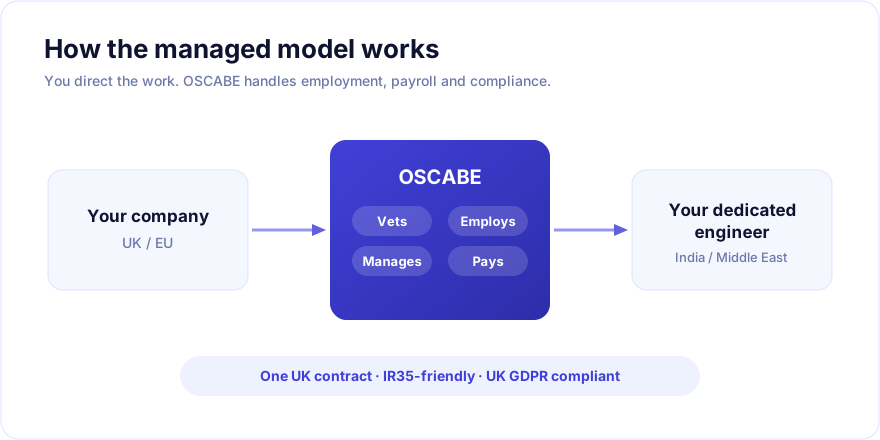
Because OSCABE employs the team directly and aligns them to your hours, the overlap window is dependable, handovers happen on schedule, and you contract with one UK-registered company rather than coordinating a patchwork of individuals. For Gulf-based delivery specifically, our guide to hiring remote developers in the Middle East and GCC covers the GST overlap in more detail. Explore the broader model on our how it works page.
Frequently asked questions
How many hours of overlap do you really need?
Usually 4 to 6 hours is plenty, and even 3 focused hours can work if your async habits are strong. The number that matters is enough overlap to run a stand-up and clear blockers live; the rest of the day can be asynchronous.
Will an India or Gulf team work my hours?
With a managed provider, yes. OSCABE aligns the team to your core hours, so the overlap is reliable. With independent freelancers, availability varies, which is precisely the coordination problem a managed model removes.
How do we stop chat from becoming an always-on expectation?
Set explicit response-time norms (for example, a reply within one working day), move durable decisions out of chat into docs and issues, and use threaded channels. Nobody should feel obliged to monitor chat overnight.
What is the most common mistake managing distributed teams?
Letting the overlap window erode and relying on real-time chat for everything. When that happens, work becomes slow and sequential. Engineer a protected overlap, then push the rest of the work into clear, written, asynchronous practice.
Ready to run a distributed team that stays in sync?
If you want the productivity of a cross-time-zone team without the coordination headaches, the recipe is a protected overlap window, disciplined async habits, structured handovers and a provider that holds the schedule for you. OSCABE delivers dedicated, vetted teams aligned to your core hours under one UK contract. See how it works, get in touch, or browse our engineers to start matching candidates now.